p5_01 - First-Pass Hyperparameter Tuning (RandomizedSearchCV)
Step 1 of 3. Run a generic
RandomizedSearchCVover Logistic Regression hyperparameters. Demonstrates that a textbook-default search space (withclass_weight: ['balanced', None]only) typically does NOT beat the FE1 baseline. Sets up the puzzle thatp5_02solves.
1. What we are going to do?
We hand-picked one set of hyperparameters back in p4_03 (Section 06) and trained a model. The natural next question: are those the BEST hyperparameters? Or could the search machinery find something better?
This script answers that question the way most ML tutorials would teach it: - Define a "reasonable" hyperparameter search space (C, l1_ratio, solver, max_iter, class_weight) - Let RandomizedSearchCV sample 20 random combinations - 5-fold cross-validation scores each combination using a custom Net Benefit scorer - Pick the winning combination and evaluate it on the test set - Compare the result to the FE1 baseline
The honest outcome: the generic search HURTS Net Benefit by ~$2,675 vs FE1. That is not a bug. It is the puzzle. p5_02 shows the fix.
2. What exactly is it?
RandomizedSearchCV is sklearn's randomized hyperparameter search machinery. Given an estimator and a parameter distribution, it:
- Samples
n_iterrandom combinations from the parameter distribution - For each combination, fits the estimator
cvtimes (cross-validation folds) - Scores each fit using the provided scorer
- Picks the combination with the highest average CV score
The 5-fold cross-validation mechanic (what cv=5 actually does)
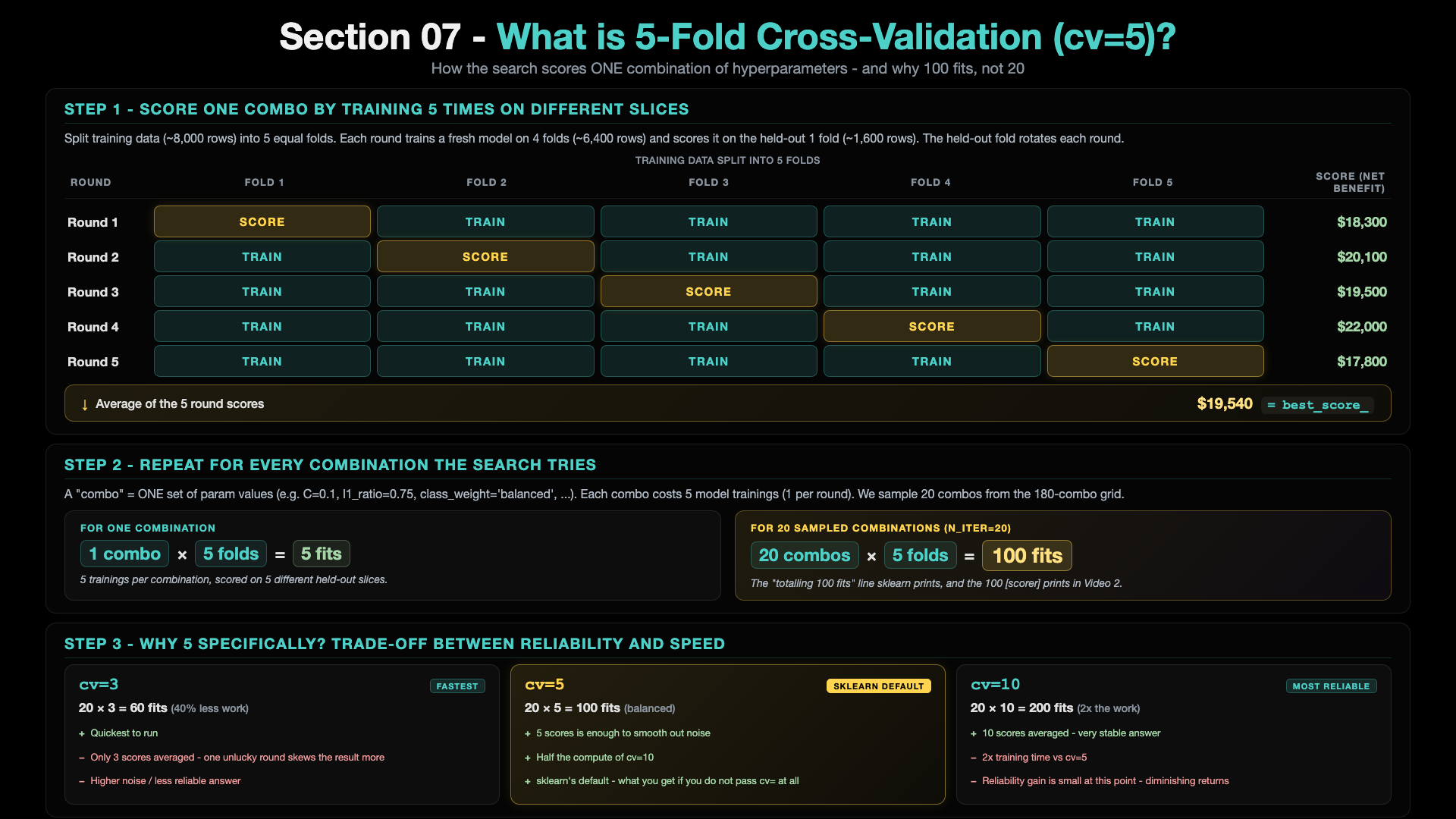
Each combination of hyperparameters is trained 5 times - each round holds out a different fold as the score slice. The 5 round scores are averaged → that average is the combination's best_score_. Then multiply by n_iter=20 random combos → 100 fits total in this script. cv=5 is sklearn's default - the sweet spot between reliability (more folds smooth out noise) and speed (fewer folds run faster).
Why it fails on our problem
The search space includes only class_weight: ['balanced', None]. 'balanced' uses inverse class frequencies (~{0: 0.5, 1: 16} for our ~3% fraud rate, a 32:1 penalty ratio). But the dollar cost ratio is $1,500 fraud / $25 false alarm = 60:1. So 'balanced' is under-weighting fraud relative to the dollar reality. The search picks combinations that look good by F-1-ish metrics but lose money. We will fix this in p5_02 by widening the class_weight grid to include aggressive money-weighted dictionaries like {0:1, 1:100}.
Key code blocks in the script:
business_value_scorer(y_true, y_pred)- 3-line custom scorer that returnscalculate_business_metrics(...)['net_benefit']. Wrapped viamake_scorer(..., greater_is_better=True)so the search optimises dollars, not F1.param_distributions = {...}- the search space (180 combinations possible)RandomizedSearchCV(estimator=pipeline, ..., n_iter=20, cv=5, scoring=business_scorer, n_jobs=-1, random_state=42)- the search machineryrandom_search.fit(X_train, y_train)- runs 20 combinations x 5 folds = 100 model fits
3. How to run it
Step 1 - make sure you are in the mlops-env1 conda environment
# Check what conda environment you are currently in
conda info --envs
# Look for the asterisk (*) - that marks the active env. If it is not on
# mlops-env1, switch:

conda deactivate          # only needed if you are in a different env
conda activate mlops-env1
If mlops-env1 does not exist yet (first time on this machine), see the Pre-requisite section in the section README.
Step 2 - go to the project folder
Step 3 - make sure data + FE1 CSV exist
# Only needed if you have not generated them yet (one-time setup)
python p1_01_generate_initial_dataset.py
python p4_01_feature_engineering_fe1.py
Step 4 - run this script
Runtime: roughly half a minute to a few minutes depending on your CPU.
4. What is the result output?
The script prints, in order:
- Header banner:
p5_01 - HYPERPARAMETER TUNING (RandomizedSearchCV) - STEP 1-3: load FE1 CSV, split data, create Pipeline (via
create_pipeline()helper, same as p3_01/p4_03) - STEP 4: define the custom Business-Value scorer (the function and
make_scorerwrapping) - STEP 5: search-space + sampling plan banner, then sklearn's progress lines:
The Space:  6 C  x  5 l1_ratio  x  1 solver  x  3 max_iter  x  2 class_weight  =  180 combinations
  -> class_weight = ['balanced', None] only  -  this is the NARROW part
The Plan:   pick 20 of those 180 randomly  (RandomizedSearchCV)
The Work:   each of the 20 picks gets 5-fold cross-validation
            20 x 5 = 100 training jobs

verbose=2 below - you will see one line per fit as the search runs.

Fitting 5 folds for each of 20 candidates, totalling 100 fits
STEP 6: Best Parameters Found

BEST PARAMETERS:
  solver: saga
  max_iter: 2000
  l1_ratio: 0.75
  class_weight: balanced
  C: 0.1

Best CV Net Benefit: $20,900
  - averaged across the 5 CV folds (each scored on ~12 frauds = low absolute value)
  - this is a RANKING signal for the search, not the number you would ship to production
  - the real test-set Net Benefit appears in STEP 7 (and will be higher)
What you actually get back from the search - best_estimator_
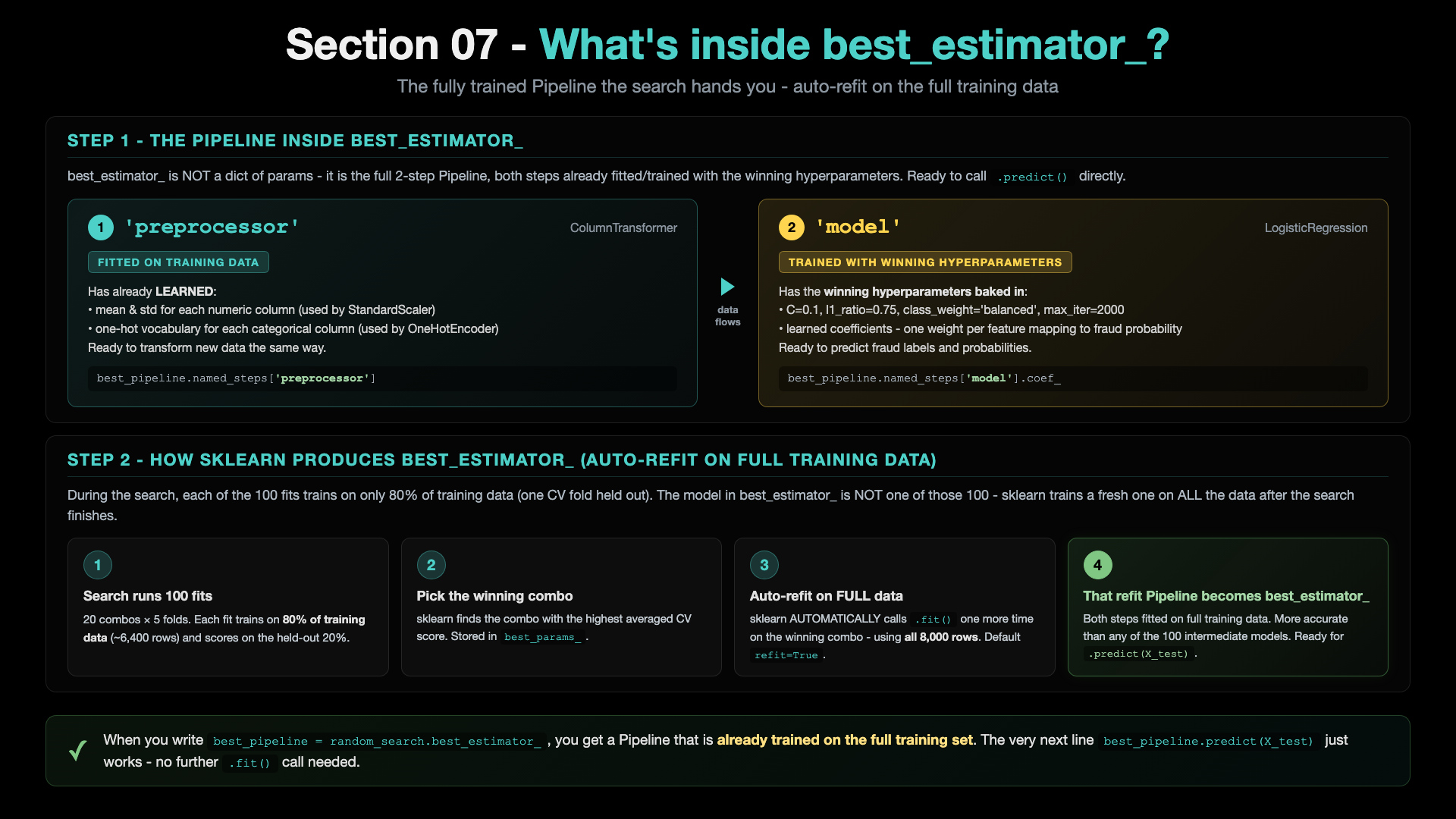
After random_search.fit(...) finishes, random_search.best_estimator_ is the complete 2-step Pipeline (preprocessor + model) already FITTED and TRAINED with the winning hyperparameters - and trained on the FULL training set, not just one CV fold. sklearn auto-refits on full data via the refit=True default. So best_pipeline.predict(X_test) just works - no further .fit() needed.
- STEP 7: test-set evaluation block with all technical + business metrics
- STEP 8: save model + metadata + metrics JSON
- Closing IMPROVEMENT JOURNEY block:
IMPROVEMENT JOURNEY SO FAR
======================================================================

 Stage 1 - Baseline (p3_01, no FE):           F1=0.2329   Net Benefit=$39,625
 Stage 2 - + FE1 (p4_03, + amount_ratio):     F1=0.2347   Net Benefit=$39,700   (+$75 vs Stage 1)
 Stage 3 - + RandomSearch (p5_01):            F1=0.2375   Net Benefit=$37,025   ($-2,675 vs Stage 2)

 Total change vs Stage 1 baseline:            $-2,600

 RandomSearch did NOT improve on FE1 - lost $2,675.
 The search space here is too narrow on class_weight.
 p5_02 will show the fix.

 Run next: python p5_02_class_weight_gridsearch.py
5. Complete metrics table
| Metric | Value | Note |
|---|---|---|
| F1 Score | 0.2375 | slightly up vs FE1 (0.2347) |
| Precision | 0.1411 | TP / (TP + FP) = 45 / 319 |
| Recall | 0.7500 | TP / (TP + FN) = 45 / 60 |
| ROC AUC | 0.8851 | unchanged - threshold-independent |
| Net Benefit | $37,025 | DOWN $2,675 vs FE1 ($39,700) |
| Fraud Caught (TP) | 45 / 60 | one fewer than FE1 |
| Fraud Missed (FN) | 15 | one more than FE1 |
| False Alarms (FP) | 274 | fewer than FE1 (286) |
| True Negatives (TN) | 1,666 |
Best params picked by the search: solver=saga, max_iter=2000, l1_ratio=0.75, class_weight='balanced', C=0.1
Output artifacts: - models/p5_01_randomsearch/model_latest.pkl - models/p5_01_randomsearch/metadata_latest.json - results/logistic_regression_p5_01_randomsearch_*.json
Where this fits in Section 07
This is the first of 3 scripts. See the section README for the full 3-script arc and the comparison table. The next script - p5_02 - shows why the search failed here and what to do about it.
Prefer to learn by watching?
The video course builds this whole project with you on screen, step by step.